¶ Running labs
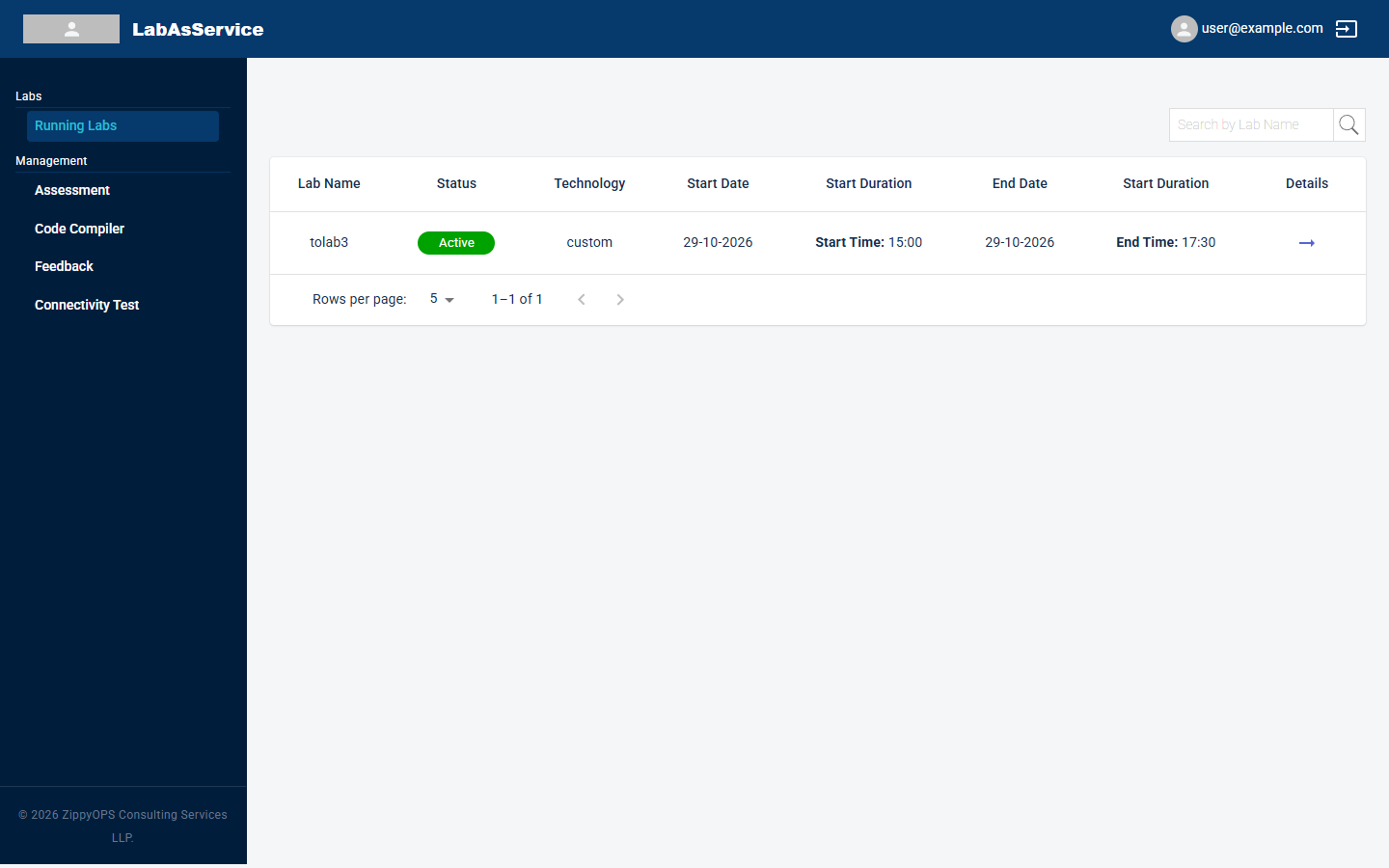
Running Labs is the first page you see after signing in as a trainee. It lists every lab your trainer or administrator has assigned to you.
¶ What the list shows
| Column | Meaning |
|---|---|
| Lab Name | The name given to the lab when it was created |
| Status | The current state of the lab, for example Active |
| Technology | The lab type, for example custom |
| Start Date and Start Duration | The date and time the lab starts (shown as Start Time) |
| End Date and the second Start Duration column | The date and time the lab ends (shown as End Time) |
| Details | The arrow that opens the lab's details page |
The second column headed Start Duration shows the lab's End Time.
¶ Finding a lab
- Type part of a lab's name into Search by Lab Name and select the magnifying-glass button.
- Use Rows per page and the previous/next arrows at the bottom of the table to move through longer lists.
¶ Opening a lab
Select the arrow in the Details column. This opens the lab's details page, where you can see the servers assigned to you and connect to them. See Connecting to your lab.
¶ If your list is empty
You only see labs you have been assigned to. If you expect a lab and it is not listed, ask your trainer or administrator to check that you were added to it (see Assigning trainers and trainees).